
Watch offline
Download movies and episodes over Wi-Fi and watch them on the train, on a plane or anywhere without a connection. Queue as many as you like: they download one after another.
The Netfly TV phone app
The Netfly TV app for Android phones and tablets: live TV with the TV guide, movies and series, catch-up and recordings, plus downloads to watch offline. Sign in with your email and it's all there. Free for every Netfly TV customer.
On a computer? Open this address on your phone: netflytv.com/amb · Version 1.0.0
Made for your phone
Download movies and episodes over Wi-Fi and watch them on the train, on a plane or anywhere without a connection. Queue as many as you like: they download one after another.
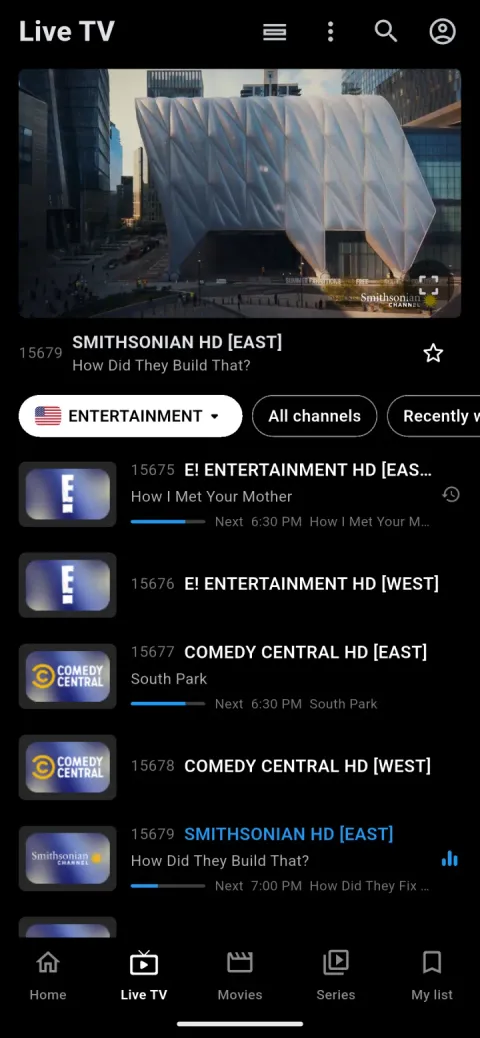
Tap a channel to watch it in the preview while you keep browsing. Tap it again for full screen.
See what's on now and next on every channel, go back to shows you missed on catch-up channels, and get a notification before a show starts.
On a tablet, the app uses the whole screen: a side menu, bigger posters and pages laid out for the big screen.
Inside the app
Your channels by country and category, with your own country first. Tap one to preview it, and again for full screen.
Programme times for every channel, a day at a time. Tap a show that hasn't started yet to get a reminder or record it.
Browse by category with posters and ratings, with your country's titles first and the newest on top.
The story and the rating, then play it, add it to My list or download it for later.
Open a show, pick the season and the episode, and carry on where you stopped. Download episodes for the road.
Turn the phone sideways for full screen. Change the audio or subtitles, set a sleep timer, fix the audio delay, or jump to the guide and your history, all from the player.
All included
Watching on a TV too?
Our TV app runs on Android TV, Google TV and Fire TV, with the same sign-in and the same subscription.
Install
The app comes from our website, so Android asks you once to allow the install. That's normal for apps installed from a website.
On your phone or tablet, open netflytv.com/amb in the browser. The app downloads.
Open the downloaded file. If Android asks, allow your browser to install apps, then tap Install.
Open the Netfly TV app and sign in with the email from your order.
Updates: the app lets you know when a new version is out. You can also check any time in Settings → Check for updates.
iPhone or iPad? There's no app for them yet: this one is for Android phones and tablets.
FAQ
Yes. The app is free for Netfly TV customers: your subscription is what you pay for, and it works in the app at no extra cost.
Android phones and tablets running Android 7.0 or newer. On a tablet, it uses the whole screen.
Not yet. The Netfly TV app is for Android for now.
Open a movie or an episode and tap Download. You can queue several: they download one at a time and start on their own, one after another. Downloads stay on your phone and play without a connection while your subscription is active.
Yes. The phone counts as one of your subscription's connections, like a TV. With a one-connection subscription, watch on one device at a time. A download uses the connection too while it downloads: you can pause it any time.
The app comes from our website rather than the Play Store, so Android asks you once to allow the install. That's normal for apps installed from a website.
The app checks for a new version and offers it in one tap. You can also check any time in Settings → Check for updates.
Yes. Install our TV app on Android TV, Google TV or Fire TV and sign in with the same email.
Ready to watch on your phone?
Download the app, sign in with your email, and your subscription is there.
Not a customer yet? Start with a trial